

The heartbeat of
your fitness studio
Manage bookings, memberships, and payments with ease. The all-in-one SaaS platform designed for modern fitness spaces.
14-day free trial · No credit card required · Joining as a member?


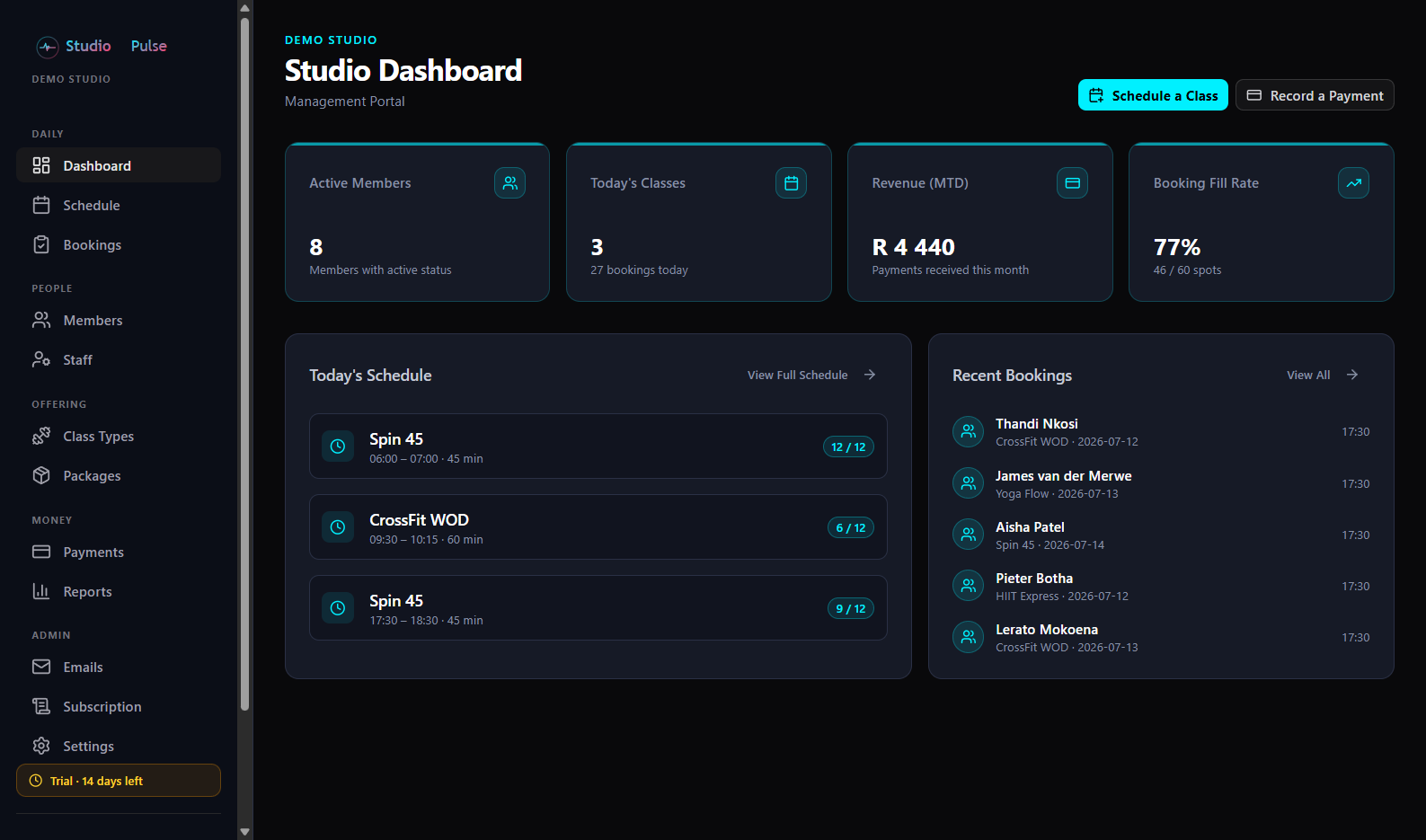
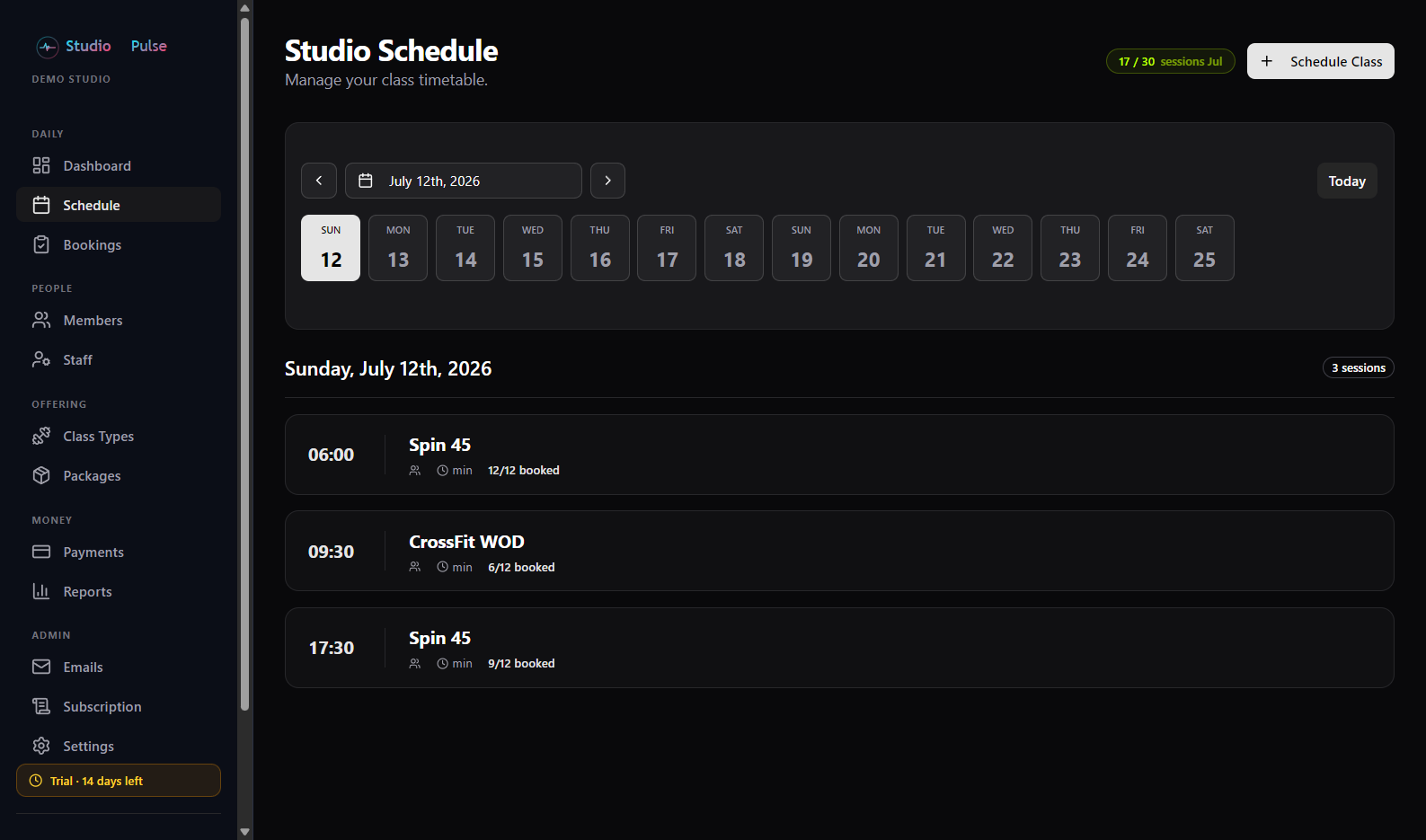
Run your studio from one dashboard
Members, revenue, and today's classes at a glance - with a drag-free weekly schedule your front desk will actually enjoy using.
Everything your studio needs
One platform for the front desk, the schedule, and the books - so you can spend your time coaching.
Bookings & waitlists
Members book classes themselves. Full sessions run a waitlist that auto-promotes when a spot opens.
Learn more →Member management
Profiles, membership packages, credits, and approvals - everything about your members in one place.
Learn more →Payments & invoicing
Monthly memberships or once-off class packs - automatic invoices in Rands, credit notes, and card payments via PayFast, Paystack, Netcash or Yoco built in.
Learn more →Member mobile app
Your members get a polished app to book classes, track their package, and see their statement.
Learn more →Reports & insights
Revenue, attendance, and booking fill rates at a glance - know how your studio is really doing.
Learn more →Scheduling & series
Repeat classes daily or weekly as linked series - edit or cancel a whole series in one action.
Learn more →AI assistant
Ask your studio anything - schedules, members, money - and get answers from your own data. Connects to Claude and other AI apps too.
Learn more →Families & kids' programs
One parent login, every child on it - each with their own class pack. Intake forms, coach registers and payroll built for kids’ coaching.
Learn more →Full list of features
AI & Integrations
- In-app AI assistant for admins & coaches
- Answers grounded in your own studio data
- Role-aware: coaches only see what they may
- Read-only by design - AI can look, not touch
- Claude integration via MCP (open standard)
- Personal, revocable AI access keys
- Two-way accounting sync with SmrtLedger
Scheduling & Classes
- Class types with duration & capacity
- Daily / weekly repeating class series
- Edit or cancel a whole series in one action
- Month-at-a-glance schedule view
- Locations & venues - second branch, park, client gym
- Room layouts with member spot selection - bikes, mats, rebounders
- Automatic refunds & notices on cancellations
- Clone sessions
- Cancellation reasons shared with members
Bookings & Waitlists
- Self-service booking (app & web)
- Booking open/close windows
- Credit deduction per booking
- Late-cancel policy with credit forfeit
- Waitlist with timed offer-and-confirm
- Push + email waitlist offers
- Admin manual booking on behalf of members
- QR check-in with attendance tracking
- Month calendar of bookings with fill counts
- Recurring-slot grids - who attended which week
- Studio-managed classes only you can fill
- Filter bookings by member, category or venue
Members
- Member profiles & statuses
- Packages, credits & renewals
- Package change requests with approval
- Pro-rata billing on package changes
- Custom profile questions - your own fields
- Digital waivers with e-signature & versions
- Waiver required-before-booking option
- POPIA data export & anonymization
- Join link & front-desk QR code
- Sign in with Google & Apple
Families & Kids' Programs
- Family accounts - children on a parent’s login
- Each child has their own package & credits
- Parents book per child from the app or web
- Parents buy class packs per child at checkout
- Parent’s signed waiver covers their children
- Intake forms you build - sections, Yes/No, choices
- Forms answered per child, refreshed yearly if you like
- Optionally block booking until a form is completed
Coaching & Payroll
- Coach register: check-ins & no-shows with reasons
- Mark attendance days later - the past week stays open
- Coaches add walk-in / make-up members by name
- Per-session coach expenses (permits, parking, travel)
- Rate cards per coach by session length
- Payroll totals: fees + expenses per coach, CSV export
Moving from another system
- CSV member import with silent invites
- Create accounts before members ever sign in
- Packages keep their original start dates
- Carry over remaining credits - nobody re-billed
- One-click "your account is ready" go-live emails
- Set up everything first, launch when you’re ready
Payments & Billing
- Monthly memberships or once-off class packs
- Once-off pricing: full price, no pro-rata, no renewals
- Automatic monthly invoicing in Rands
- Your own billing day
- Numbered invoices & credit notes
- Cards & instant EFT - PayFast, Paystack, Netcash or Yoco
- Connect your own merchant account - money settles with you
- Test mode on every gateway before going live
- Cash / EFT manual payment capture
- Member statements & balance nudges
Member App & Portal
- Android & iPhone member apps included free
- Push notifications
- Add booked classes to any calendar
- Personal check-in QR code
- Statements & online payment
- Mobile-friendly web portal
Communications
- 18+ automatic emails (bookings, billing, waitlists…)
- Per-email on/off toggles
- Custom messages on any template
- 24-hour booking reminders
- Email delivery logs
Reports & Growth
- Fill rates by class & trainer
- Revenue: collected vs invoiced
- Attendance & no-show numbers
- Member growth & busiest days
- Lead capture & pipeline
- Public booking page in your branding
- Embeddable website schedule widget
- Public inquiry page
Staff & Security
- Staff accounts with limited access
- Role-based portals (admin / staff / member)
- Full audit log of studio actions
- Tenant-isolated data & security rules
Platform
- Free plan for small studios
- 14-day free trial on paid plans
- Upgrade / downgrade anytime
- Studio branding: logo & colours
- No setup fees, no contracts
Up and running in minutes
Create your studio
Pick a plan and sign up in under two minutes. No credit card needed to start.
Set up classes & packages
A guided checklist walks you through creating your class types, schedule, and membership packages.
Share your join link
Every studio gets a unique link. Members sign themselves up, book classes, and you’re running.
Already on another platform?
Switching is the easy part
The thing that keeps studios stuck on expensive software is the fear of moving their members. We built the move itself into the product - set everything up quietly, then flip the switch when you're ready.
Bring your members in
Import from a CSV or add them one by one - accounts are created without a single email going out, so nobody hears about the move before you want them to.
Nobody gets re-billed
Assign each member their package as a migration: no invoice is raised, their cycle keeps its original start date, and the credits they had left come with them.
Go live on your day
When everything looks right, send each member a "your account is ready" email. They set a password (or sign in with Google or Apple) and land on a fully loaded account.
Moving a bigger studio? We'll help with the heavy lifting - schedule, class types and all - book a demo and tell us what you're moving from. Or see how we compare →
Simple, transparent pricing
No demo call. No sales gate. No add-ons. Every plan includes every feature - start free and upgrade as your studio grows.
Free
Free Plan
Forever free
- Up to 15 members
- Up to 30 classes
- Up to 1 staff accounts
- Bookings & waitlist management
- Member mobile app included
Small
Starter studio
- Up to 50 members
- Up to 90 classes
- Up to 5 staff accounts
- Bookings & waitlist management
- Member mobile app included
Member app included
Bookings, waitlists, statements and push notifications on every plan - at no extra monthly fee.
Automation included
Waitlist offers, repeating class series, monthly invoicing, credit refunds and reminder emails all run themselves.
No surprises
No setup fees, no long-term contracts, no per-feature add-ons. Billed in Rands, cancel anytime.
Every plan starts with a 14-day free trial. Billing setup available after onboarding.
Wondering how we stack up against the big platforms? See the honest comparison →
Frequently asked questions
How long is the free trial?
Every plan starts with a 14-day free trial with full access to all features. No credit card is required to start.
What happens when my trial ends?
You choose a plan and set up billing from your studio portal. Your data stays exactly as you left it.
How do my members join?
You share your studio’s unique join link (or show the QR code at your front desk). Members create their own accounts and book straight away - no admin work on your side.
Can I move my studio across from another platform?
Yes - and nobody gets re-billed. Import your members (CSV or one by one) with no emails going out, assign their packages with the original start dates and remaining credits carried over, then send everyone a “your account is ready” email on the day you go live. For bigger moves we’ll help bring your schedule and class types across too - book a demo and tell us what you’re moving from.
How do payments work?
Invoices are generated in South African Rand. Connect your own PayFast, Paystack, Netcash or Yoco account - whichever you already have or prefer - and your members pay by card or instant EFT straight into it. The money is yours from the moment it clears; we never hold it. Until you connect a gateway, members pay you by EFT using your banking details, and you record the payment. You can capture cash payments the same way.
Can I cancel or change plans?
Yes - upgrade, downgrade, or cancel any time from your studio portal. No long-term contracts.